

Tee Sheet ยท Club plan
Back9Ops icon
Back9Ops

A tee sheet that already knows your calendar.

The counter's screen for today, online booking with your own green fees on it, and the events and league nights you already run closing the right times by themselves.

It's included with the Club plan โ€” and switching it on is your call. Nothing about how you take bookings changes until you turn the sheet on in Settings, and you can turn it off again whenever you like. Turning it off hides the sheet and stops online booking; it deletes nothing, and your upcoming bookings come straight back when you switch it on again.

See the Club plan โ†’ See the front desk
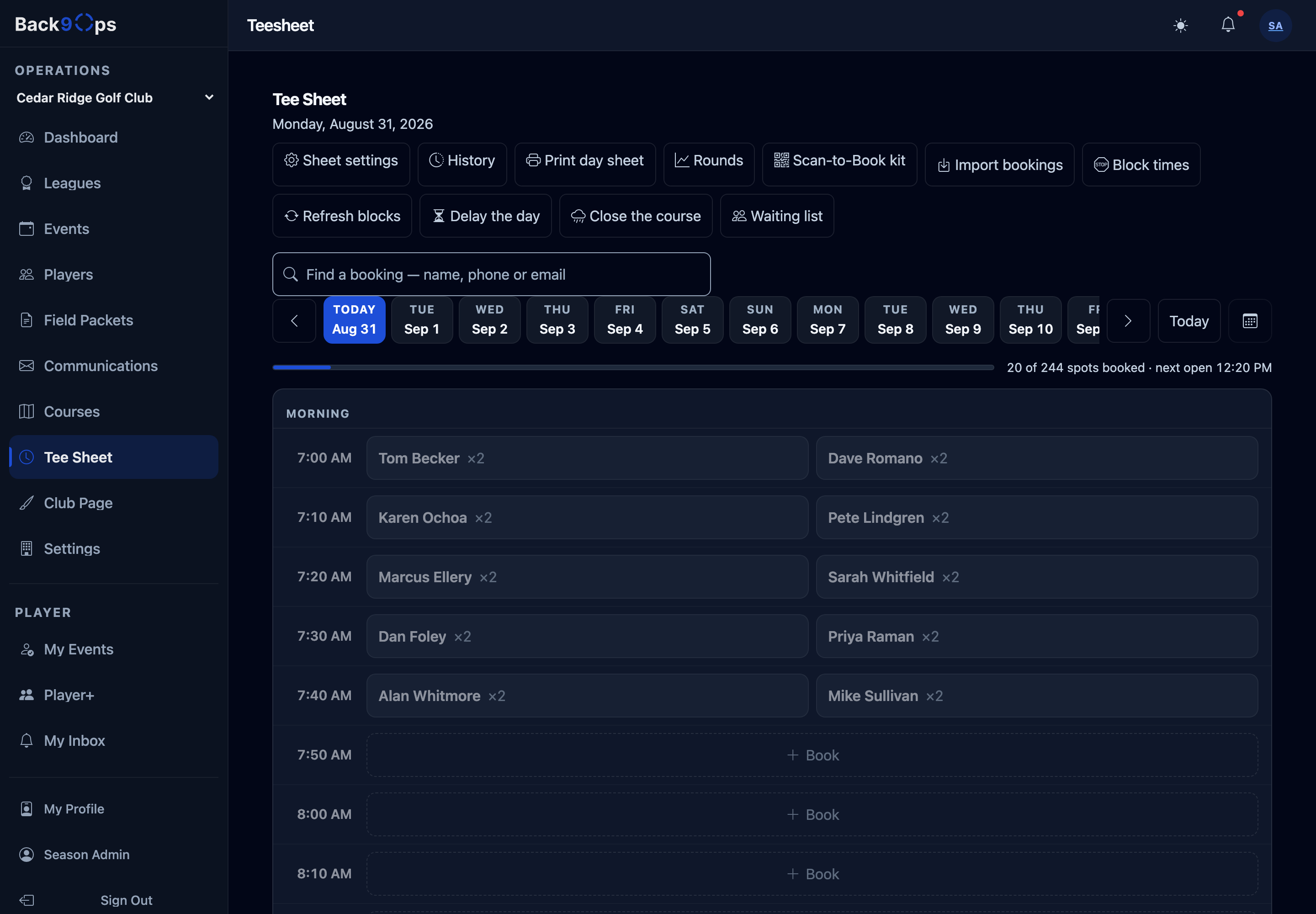
The tee sheet for today: morning groups booked two to a tee time, how many spots are taken, the next open time, and the day's controls along the top

Example sheet โ€” your course, your times, your green fees.

It already knows what else is happening.

Most tee sheets are only a tee sheet. They don't know your member-guest is on Saturday, so somebody has to remember to block the morning โ€” and somebody has to remember to unblock it.

Your events close their own tee times

Because the same system is running the event, the sheet already knows about it.

  • Book an event or a league night and the right times close themselves
  • The block resizes as the field grows and shrinks
  • If a booking is already in the way, you're told โ€” with a number you can tap to call
  • Nothing is ever cancelled behind your back. You decide: keep it, contact them, or cancel.

The counter's screen for today

Built for a person standing up, with a queue.

  • Book a group, move one to another time, check them in
  • Move a group by mistake and there's a Put it back button
  • Search the sheet, see who made a change, print the day
  • Record a booking that came from somewhere else โ€” a booking site, a phone call โ€” so the same time can never be sold twice

Three screens, no account, no booking fee.

A golfer picks a day, picks a time, and puts their name in. That's the whole thing.

1

Pick a day and a time

Your open times, on your own page, on any phone. Nine holes or eighteen, if your course sells both.

2

Put a name in

No account to create, no password, no app. Members are recognised and see their own price.

3

Keep the link

They get a private link to change or cancel it themselves, up to whatever cutoff you set.

Your green fees, priced the way you actually price them.

๐Ÿท๏ธ

Seasons, weekends, holidays

Different rates for different times of year, weekends, and the days everyone charges differently. Set once, right all season.

๐Ÿ›บ

Riding, walking, and who's playing

Cart and walking rates, plus senior, junior, and resident prices โ€” shown to the golfer before they book.

โ„๏ธ

Frost delay in one move

Push the day back and every group still to tee off is told their new time. Close the course with a reason and everyone booked hears it โ€” nothing cancels itself.

๐Ÿ”

The Saturday group keeps its 8:00

Standing tee times week after week, without anyone re-booking them by hand every Monday.

“But we already have bookings on the books.”

Every course asks this, and it's the real reason tee sheets don't get changed. So we move them with you.

๐Ÿ“ฆ

Your existing tee times come across

Bring the bookings you already have from your current system, so day one isn't an empty sheet with a hundred golfers holding confirmations. Paste them in โ€” no file to export, format, and re-export when it doesn't take.

๐Ÿงญ

And they stay recognisable afterwards

A ported booking is kept distinct from one taken here, so when you look at the month you can tell the tee times you brought with you from the ones the new sheet actually earned.

Fill more tee times โ€” or keep them whole.

A busy muni pairs singles up to get more rounds in. A quieter club would rather sell the whole tee time. That's a question, not an assumption, so we ask it.

Pairing golfers up

  • Turn it on and a part-booked time keeps selling its remaining seats online โ€” and tells the golfer plainly they'll be sharing
  • Turn it off and a part-booked time comes off the online sheet entirely
  • Either way the counter can still pair people up on the phone โ€” that's the shop's judgement, and this only closes the self-service door

Members get treated like members

  • A booking window that opens for members before it opens to everyone
  • Members-only hours, and the member rate shown to the member
  • Members are recognised when they book, without making them create an account first
  • Prefer it stricter? Require sign-in before any member perk applies
โœฆ The awkward one

No-shows, without holding anybody's card.

Every no-show policy we looked at enforces with money โ€” a card on file, a forfeited deposit, a green fee charged anyway. Back9Ops deliberately takes no card, so that lever doesn't exist here. What's left is the other one those same courses use: count them.

  • Mark a no-show at the counter in one tap, on the sheet you're already looking at
  • You choose how many it takes before that golfer stops being able to book online โ€” and it's off unless you turn it on
  • It only ever closes the self-service door. Your counter can still book them by phone, because that's your call and not ours
  • A golfer nobody checked in and nobody marked absent is counted as exactly that โ€” not quietly recorded as a no-show

When the weather decides for you.

The rule underneath all of this: the software never cancels a golfer's tee time on its own. It tells you, and you decide.

๐ŸŒง๏ธ

Close the day, with a reason

Everyone booked is told, in your words. Nothing cancels itself โ€” every booking lands in a list for you to work through.

โ˜Ž๏ธ

Keep, contacted, or cancel

Three buttons per booking, and the sheet remembers who spoke to whom and when. So the second person at the counter doesn't ring the same golfer again.

๐Ÿ•˜

Or just push it back

Frost delay: move the day and every group still to tee off is told their new time. No ringing round forty golfers.

๐Ÿ“Š At the end of the day

The numbers you actually reconcile.

Not a report builder. One page, with the handful of figures a small course adds up anyway โ€” and honest about what it doesn't know.

  • Rounds played, split nine and eighteen
  • Member rounds against public rounds
  • Checked in, no-shows, and the honest middle โ€” the ones nobody marked either way
  • Where they booked: online, the counter, the app, or somewhere else
  • Cancellations counted separately, because a cancellation is not a round played
  • Download the lot as a spreadsheet
๐Ÿ–จ

A counter card for the pro shop

Print a "Scan to Book" card with your course on it and a QR that opens your booking page. One scan, three taps, booked. Put it by the register and on the starter's hut.

And print the day's sheet whenever you want it on paper.

And it's the same system running everything else.

That's the whole point. The tee sheet isn't a separate product bolted on โ€” it's the reason your events and league nights can close their own tee times.

๐Ÿงพ

The front desk

Counter staff sign in with a name and a four-digit code โ€” no email address, no password. On every plan, including Free.

How the front desk works โ†’

๐Ÿ†

Events and outings

Registration, flights, shotgun starts, contests, cart signs, live leaderboards, and sponsors on every screen.

See outing software โ†’

๐Ÿ“…

Leagues

A whole season from one night on the calendar โ€” subs, standings, handicaps, and the season published on day one.

See league software โ†’

Included with Club

Move your tee sheet without losing a booking.

Bring your existing tee times across, set your green fees once, and switch it on when you're ready โ€” not before. If you'd rather we walked you through it, say so and we will.